Max trades per day
Limit the number of trades allowed in a trading day so frequency stays aligned with the plan.
A risk-management and trading-discipline assistant for MetaTrader 5 manual traders.
Set your daily plan. Trade manually. Let TradeGuard protect the plan.
Important
TradeGuard Pro MT5 does not guarantee profit and does not provide financial advice. It is a risk-management tool designed to help traders enforce defined rules.
TradeGuard Pro MT5 does not guarantee profit and does not provide financial advice. It is a risk-management tool designed to help traders enforce defined rules.
The problem
Overtrading, late-session decisions, news volatility, spread changes, and unmanaged trades can turn a written plan into a messy execution day.
Product explanation
TradeGuard Pro MT5 does not open trades. The trader controls entries. TradeGuard controls risk, discipline, daily plan protection, session and news rules, and stop management for existing trades.
Product one-liner
TradeGuard Pro MT5 helps manual traders stop overtrading, respect daily limits, avoid bad sessions and news, and manage existing trades with break-even and trailing stop tools.
How it works
TradeGuard is configured around the daily plan first, then tested carefully so the behavior matches the user's rules.
Feature groups
The feature set is focused on rule enforcement, monitoring, and clean operational feedback for MT5 manual traders.
Limit the number of trades allowed in a trading day so frequency stays aligned with the plan.
Pause new activity after the configured daily profit target is reached.
Pause new activity after the configured daily loss limit is reached.
Track daily wins, losses, and losses in a row so discipline rules can trigger automatically.
Reset the trading day around the schedule that matches the trader's plan and broker environment.
Use Asia, London, New York, or custom session rules to trade, skip, lock, or warn by session.
Lock trading before or after news events when the trader wants a manual risk pause.
Move stops to break-even after configured movement and buffer rules are met.
Trail stops according to defined rules after positions move in the intended direction.
Check stop and freeze levels before modifying SL or TP so trade management stays broker-aware.
Apply the selected protection rules to manually opened MT5 positions.
Control whether TradeGuard manages manual trades, matching EA trades, one symbol, or supported symbols.
View status, limits, locks, filters, managed positions, and recent actions directly on MT5.
Review clear event logs for rule triggers, filter blocks, locks, and management actions.
Setup Assistant
Start with a preset, then adjust the daily plan, session behavior, and trade-management rules.
Dashboard and control panel
TradeGuard keeps status, locks, toggles, and destructive controls visible where the trader is making decisions.
Demo dashboard
All values shown in this preview are example data only and should not be read as trading performance.
TradeGuard Pro MT5
Risk state
EA Status
Active
Example data only
Daily P/L
$245.40
Example data only
Daily Loss Limit
Enabled
Example data only
Daily Profit Lock
Enabled
Example data only
Trades Today
3 / 5
Example data only
Spread Filter
Active
Example data only
Session Filter
Active
Example data only
Break-even
Enabled
Example data only
Trailing Stop
Enabled
Example data only
Managed Positions
2
Example data only
Last Action
Trailing stop updated
Example data only
Beginner mode
Beginner mode is designed to make the safest starting assumptions visible before the trader changes advanced settings.
Safety system
TradeGuard is positioned as a protection layer, not a signal engine, account manager, or external execution platform.
What it does not do
TradeGuard Pro MT5 is a risk-management tool. It is not a trading strategy, signal product, or advisory service.
Recommended users
A practical fit for traders and teams that already have rules and need better daily plan enforcement.
Product pricing
Founders Beta gives early users access at a lower price in exchange for feedback and testing. Batch pricing is for early users and does not imply trading performance.
$29
First 10 users. Early access at a lower price in exchange for feedback and testing.
For early testers who want to help shape the product while reviewing it carefully on demo first.
$49
Next 40 users after the Founders Beta group.
For traders who want access before the public launch while the onboarding materials expand.
$79
First 100 users in the launch batch.
For launch users who want the complete TradeGuard Pro MT5 workflow at an early price.
$99+
Public pricing after early batches close.
Final public pricing may change as documentation, onboarding, and support options mature.
Buyer onboarding
The onboarding flow is built around setup clarity, demo testing, and feedback before any live consideration.
Walkthrough
A recorded MT5 walkthrough is being prepared to show installation, Setup Assistant, daily plan configuration, session and news controls, break-even and trailing stop behavior, dashboard actions, and safety confirmations.
Coming Soon
The walkthrough will show the EA running inside MetaTrader 5 using a demo-account workflow. The interface previews below show the current product states while the full recording is prepared.
Interface
A closer look at the TradeGuard Pro MT5 dashboard, Setup Assistant, daily plan controls, session/news settings, and chart-based safety actions.
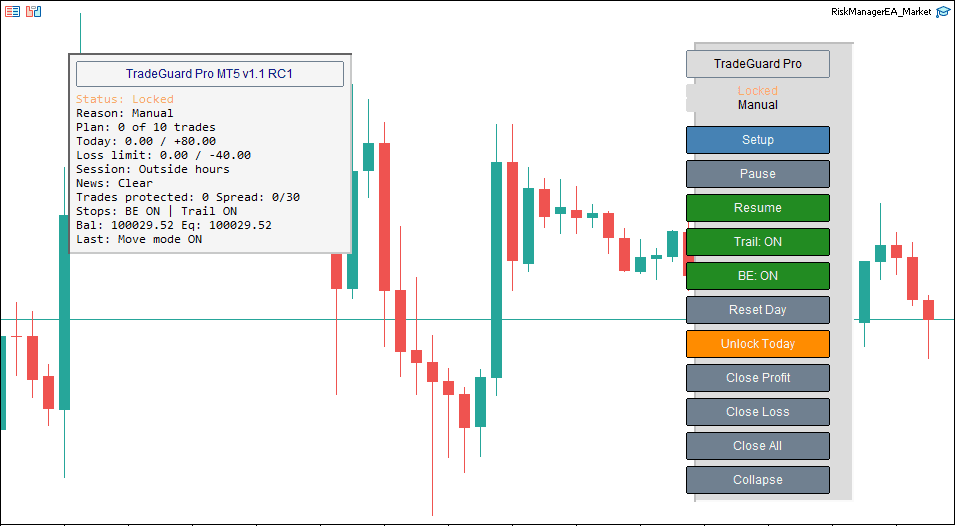
The main dashboard and control panel show the current plan status, session/news state, protected trades, break-even, trailing stop, and quick action controls.
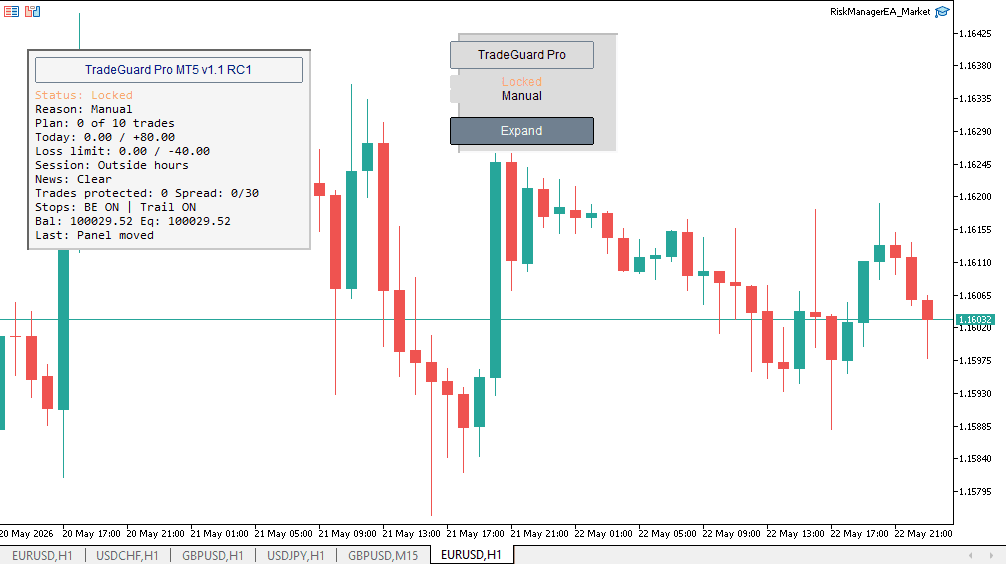
A locked state helps the trader see when a manual pause, session rule, or daily plan condition is active.
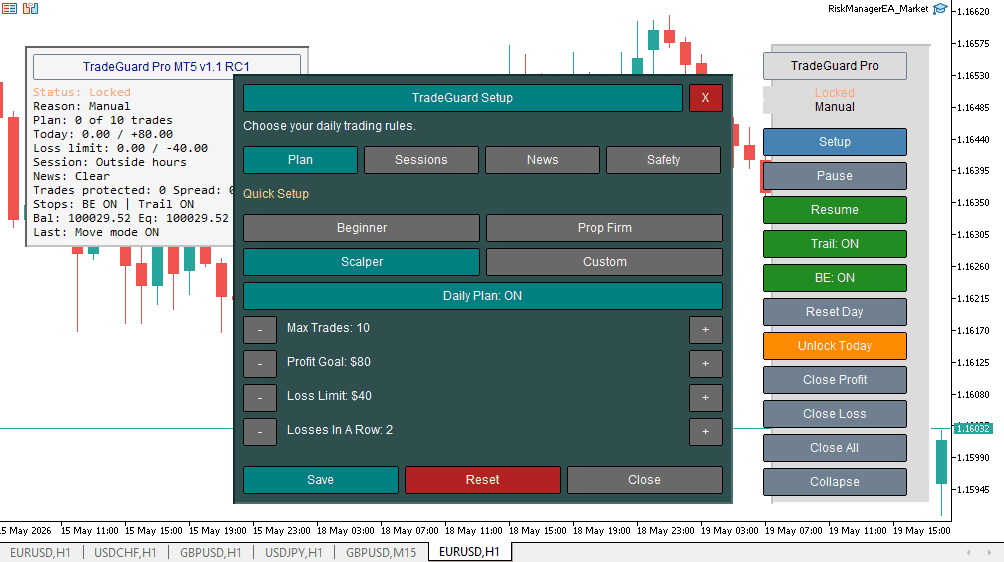
The Setup Assistant gives traders a chart-based way to configure presets, daily plan rules, session behavior, news settings, and safety options.
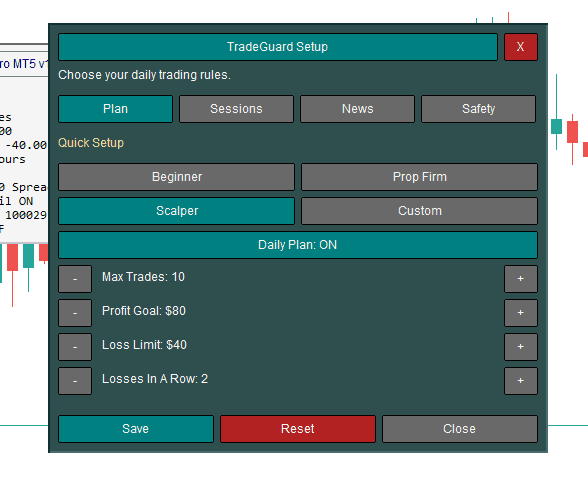
Configure max trades, profit goal, loss limit, and losses-in-a-row behavior directly from the setup workflow.
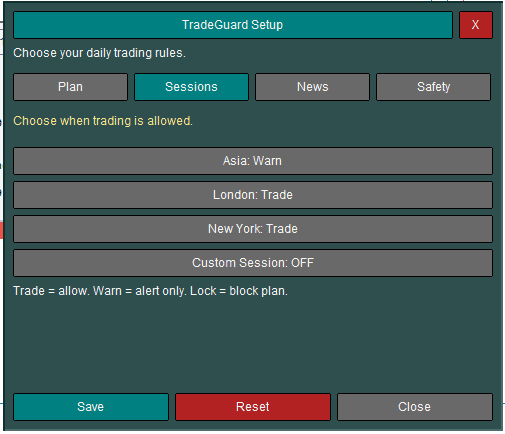
Session controls help traders define how Asia, London, New York, and custom sessions should behave.
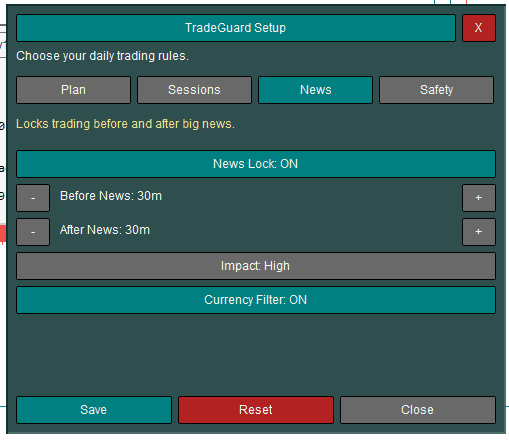
Manual news lock controls help traders prepare for scheduled high-risk events using before-and-after lock timing.
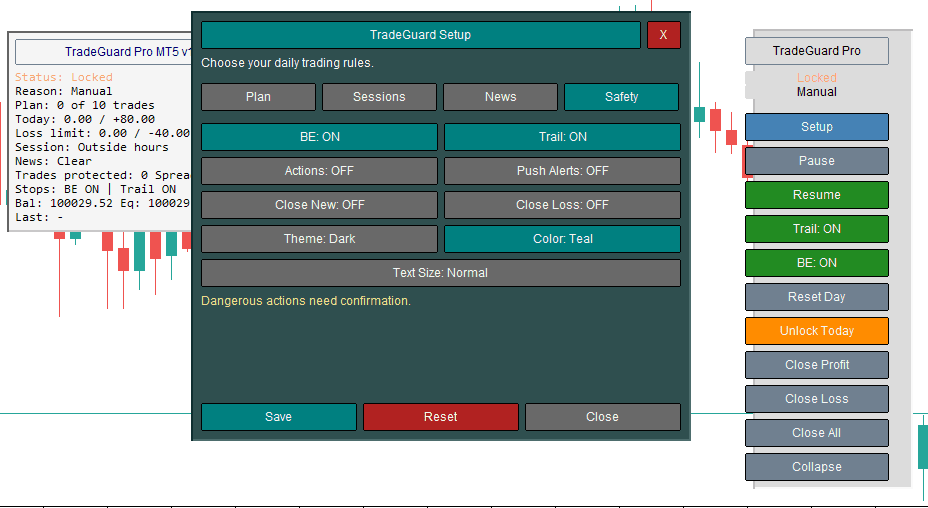
Safety options keep destructive actions controlled and help traders decide which automation behaviors are allowed.
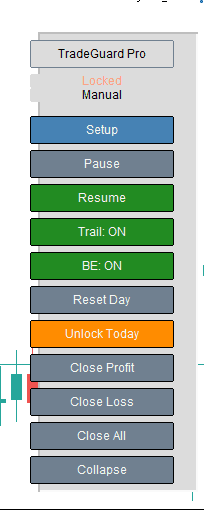
The control panel provides fast access to setup, pause, resume, break-even, trailing stop, reset, unlock, and close actions.
Version history
Version notes should document technical behavior, not trading outcomes.
FAQ
The product is a technical risk-management tool for MT5. It should be tested carefully before live use.
Swiftfolio Automation is a trading automation and trading software company building MetaTrader tools, risk-management systems, trade copiers, Telegram automations, crypto scanners, dashboards, and custom workflows for traders and trading communities.
No. TradeGuard Pro MT5 is the first featured product in the Swiftfolio lineup. The company also builds custom MT5 tools, Telegram automation, scanner dashboards, trade copiers, and future products.
Yes. We build MT5 Expert Advisors, indicators, trade managers, dashboards, copier tools, alerts, and automation workflows from documented rules.
Yes. We can build Telegram alert flows, signal parsing, review dashboards, and controlled automation workflows when the requirements and safeguards are clearly defined.
Yes. We can build scanner dashboards, alert systems, monitoring tools, and integrations for crypto workflows where requirements and risk controls are clearly defined.
No. Swiftfolio Automation builds technical tools only. Trading involves risk, and software cannot remove market risk or provide financial advice.
No. TradeGuard Pro MT5 is designed as a risk-management and trading-discipline assistant. You control entries manually or through another system.
No. TradeGuard Pro MT5 can help enforce defined rules, but trading outcomes depend on market conditions, broker execution, account settings, and the user's strategy.
It can help by counting trades, enforcing max-trade rules, locking after configured limits, and making daily plan status visible. It cannot physically stop a user from clicking in the platform.
Yes. It can be configured to manage manual trades when the selected symbol, account, and filtering rules match your setup.
Yes. Magic number filtering can be used to manage specific EA trades, all trades, or a defined group of positions depending on the setup.
TradeGuard can warn or lock according to the selected settings so the daily trade-count rule remains visible and enforceable.
TradeGuard can trigger the stop-after-profit workflow and pause new activity based on your configuration.
TradeGuard can trigger the stop-after-loss workflow and pause new activity according to the selected mode.
TradeGuard runs inside MetaTrader 5 desktop. Mobile trading decisions still depend on the user's platform behavior, broker setup, and how the account is being managed.
No. The safety positioning for TradeGuard Pro MT5 avoids WebRequest, DLLs, and external server dependencies.
It can help enforce rules such as daily loss limits, trade counts, sessions, and pause behavior. It does not ensure any challenge, evaluation, or account outcome.
Yes. Always test settings on demo first, review logs, and confirm behavior before considering any live environment.
Use the contact or demo request form and choose TradeGuard Pro MT5 Founders Beta. Early users get lower pricing in exchange for feedback and testing.
We can build monitoring and alert tooling for meme coin workflows. Execution automation in fast-moving token markets is advanced and high-risk, so scope, testing, and safeguards must be discussed carefully.
Small edits may take a few days. Full EAs or dashboards usually require one to several weeks depending on complexity, testing scope, and revision cycles.
Provide platform details, market type, entry and exit rules, risk rules, indicators, broker/account constraints, examples, budget range, and timeline.
Trading involves risk. TradeGuard Pro MT5 does not guarantee profit, does not provide financial advice, and does not remove market risk. Users are responsible for broker, account, platform, and strategy decisions.
Read full risk disclaimerNext step
Request Founders Beta access, watch the demo, or ask for setup help so the workflow can be matched to your rules.
Trading involves risk. Swiftfolio Automation builds technical automation tools only; software outputs are not financial advice.